
Build your first automation
You will have
A running workflow that you can pause at any time.
- 1
Open Automations
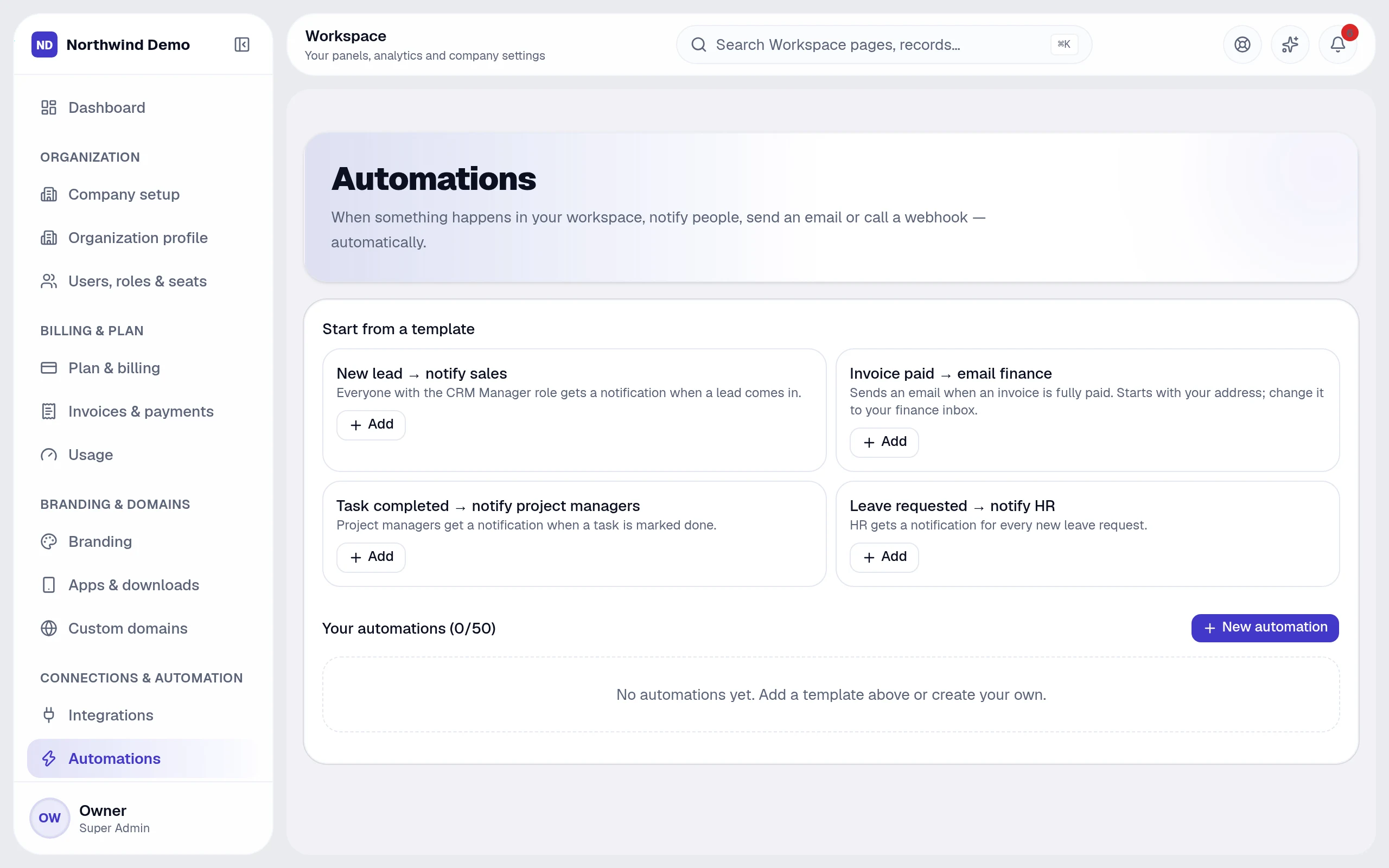
Workspace → Automations lists your workflows and a set of templates.
- 2
Pick a template
Choose “New lead → notify sales” and select Add.
- 3
Check trigger, condition and action
The trigger is a lead being created; the action notifies the lead's owner. Add a condition if it should apply only to certain leads.
- 4
Turn it on and test
Create a test lead and watch the notification arrive. The run history shows what happened and why.
- 5
Add two more
Add the invoice-paid email to finance and the leave-requested notification to HR.
Tip · Keep a person in the loop for anything that moves money.
Go deeper

Your business, running itself — starting today.
Every panel, every feature, your own brand. Start free in minutes, or let us show you the platform with your own business scenarios.
FAQs
Questions, answered.
Still deciding? These are the things people ask before they start.
What is SelfRun AI?
SelfRun AI is a cloud platform that brings your sales, HR, finance, projects, procurement, training, documents, website and team communication into one system, with AI and workflow automation running through all of it.
Do I need to use every module?
No. Each plan includes a set of modules and you switch on only what you need during setup. You can turn modules on or off later from your workspace settings.
Is there a free plan?
Yes. The Free plan is free forever for one person and includes every panel and every feature — no card needed. Paid plans add more people and bigger storage, AI, email and voice allowances.
How long does setup take?
A guided setup takes a few minutes: company details, departments, team invitations and the modules you want. Importing existing leads, clients or employees from CSV is built in.
Can I use my own domain for my website?
Yes. Plans that include a custom domain let you connect your own domain with automatic SSL. Every workspace also gets its own address on our domain from the start.