Loading…
Fetching your data…
SelfRunBusiness
Securing your session…
Fetching your data…
FAQs
About Technical SEO and SelfRun RankMax AI.
Your role may not include it. Ask your workspace owner to open Workspace → Users and give your role access to SelfRun RankMax AI.
Yes. SelfRun AI works in the browser on any device and can be installed as an app on Android, iOS and desktop, with the same screens and the same data.
No. Technical SEO comes with the SelfRun RankMax AI product, and every product is included in every plan.
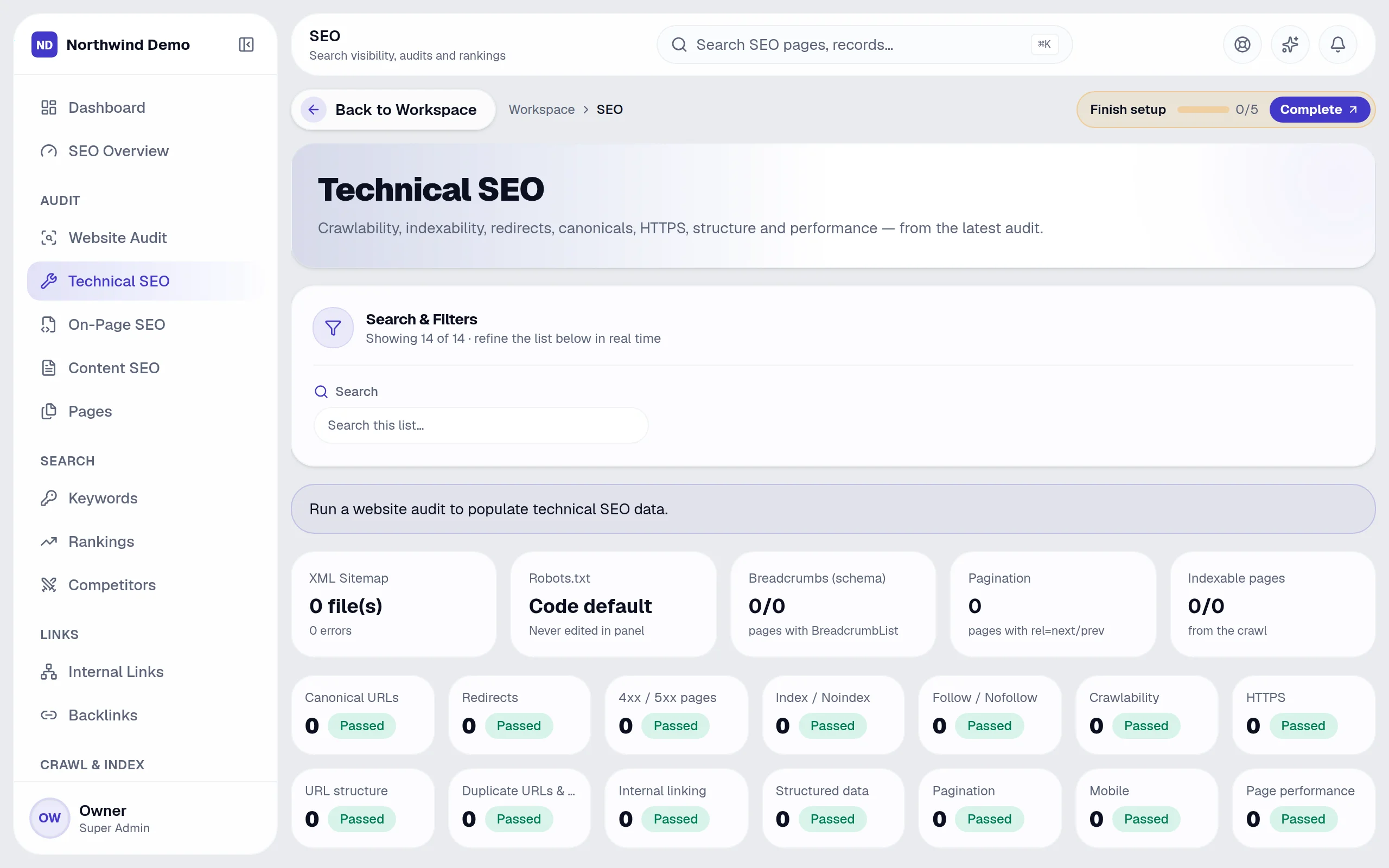
Technical SEO is part of SelfRun RankMax AI. Speed, crawl and index health. This guide takes you through it in 5 short steps.
Where it fits in your work — Audit. Crawl the site and get prioritised technical, on-page and content issues.
Step 1
Open SelfRun RankMax AI
Sign in and open the SelfRun RankMax AI product from your Workspace dashboard (or sign in to it directly). You see only what your role allows.
Step 2
Open “Technical SEO”
In the left menu, click “Technical SEO”. The “Technical SEO” screen opens.
Step 3
Find what you need
Type in the search box (“Search this list…”) to find a record quickly.
Step 4
Narrow the list
Use these filters to see only what you want:
Step 5
Open SelfRun RankMax AI → Open “Technical SEO” → Find what you need → Narrow the list → Done
SelfRun SiteCraft AI
The sitemap, robots and schema drive the live site.
SelfRun ViralPulse AI
Content that supports your search presence.
SelfRun CommandOS
Alerts when rankings or indexing change.
These are the parts of the Technical SEO screen, exactly as they appear in the product.
Search and filters
Sections
SelfRun RankMax AI replaces seo audit, rank-tracking & link tools and runs independently with its own sign-in and database.
SEO specialists
Audit, research keywords and track rankings.
Content writers
Improve pages using on-page and content scores.
Developers
Fix technical issues from the prioritised list.
Marketing leads
Review progress in reports.
SelfRun AI is a cloud platform that brings your sales, HR, finance, projects, procurement, training, documents, website and team communication into one system, with AI and workflow automation running through all of it.
No. Each plan includes a set of modules and you switch on only what you need during setup. You can turn modules on or off later from your workspace settings.
Yes. The Free plan is free forever and includes every product and every feature — no card needed. Paid plans add more people and bigger storage, AI, email and voice allowances.
Done
Speed, crawl and index health.